

TL;DR
AI automation succeeds or fails based on decisions made before any tool is opened what to automate, what not to, and how to catch mistakes before they reach customers. This guide covers the full lifecycle: planning, picking the right tool for each layer of the stack, building and testing, actually going live safely, and running it long-term illustrated with one complete case: automating lead qualification for a small B2B software company.
What “AI Automation” Actually Means
AI automation is not a single product you buy. It’s a stack made of several layers, each solving a different problem:
- A trigger — something that starts the process (a new form submission, an incoming email, a scheduled time)
- An AI step — where a model interprets unstructured input and produces structured output
- Plain automation — connecting systems together, moving data, calling APIs
- A destination — where the result ends up (a CRM record, a Slack message, a database row)
- A feedback loop — a way to catch and learn from mistakes over time
People often shop for tools before deciding what belongs in each layer, which is how projects end up over-engineered (a full agent framework for a task a spreadsheet formula could’ve handled) or under-engineered (a single fragile prompt trying to do a job that needed five separate, checkable steps).
Phase 1: Planning — Before You Touch a Single Tool
Pick a process with clear boundaries
Good first automation candidates share three traits: they happen often enough to matter, they follow a recognizable pattern most of the time, and getting one wrong occasionally isn’t catastrophic. Things like categorizing inbound leads, drafting first-pass responses to common questions, or summarizing recurring reports are strong starting points. Things like final approval on legal contracts or irreversible financial transactions are not — save those for once you’ve built trust in the system elsewhere.
Write the process down as it happens today
Before any automation exists, document the current manual version step by step, including the messy parts — the exceptions, the judgment calls, the “well, it depends” moments. This document becomes the spec for what you’re about to build, and it’s usually where you discover the process is less consistent than everyone assumed, which matters a lot once you’re asking software to follow it.
Decide your risk tolerance up front
Ask: if this automation is wrong 1 in 20 times, what happens? If the answer is “someone gets a slightly off email that a human can quietly fix,” that’s low risk. If the answer is “a customer gets charged incorrectly” or “sensitive data goes to the wrong place,” that’s high risk, and it changes how much human review needs to sit inside the workflow before anything goes live.
Phase 2: The Tool Stack
Here’s how the layers map to real tools, roughly ordered from easiest-to-adopt to most flexible:
Triggers and connective automation
- Zapier — the easiest entry point, huge app library, best for simple trigger-to-action chains
- Make (formerly Integromat) — more visual control over branching logic than Zapier, still no-code
- n8n — open-source, self-hostable, a good middle ground when you want more control without full custom code
AI/model layer
- Direct API access (Claude, GPT, etc.) — most control, requires writing the integration yourself or through a script
- Built-in AI steps inside Zapier/Make — convenient, faster to set up, less control over exact prompting behavior
- A dedicated orchestration framework (LangChain, CrewAI) — only worth it when a single step needs multiple dependent AI calls in sequence, like researching before drafting
Data storage and state
- A spreadsheet (Google Sheets/Airtable) — genuinely fine for low-to-medium volume, and easy for non-technical teammates to inspect
- A lightweight database (Supabase, Postgres) — worth it once volume or query complexity outgrows a spreadsheet
- Your existing CRM/helpdesk/tracker — often the right destination, not an intermediate stop, if one already exists
Monitoring and review
- Slack notifications with approve/reject buttons — the simplest human-checkpoint pattern
- A dedicated review queue in your existing tool (a “needs confirmation” status in your CRM, for instance)
- A simple logging spreadsheet tracking run counts and correction rates over time
The mistake worth avoiding: picking the most sophisticated option in each category by default. A three-step lead-routing automation doesn’t need a self-hosted database and an agent framework — it needs Zapier, one well-written prompt, and a Slack notification. Match the tool to the actual complexity of the task, not to how advanced you want the project to sound.
Phase 3: Build and Test
Build the smallest working version first
Before automating the entire pipeline end-to-end, build just the AI step in isolation — run your prompt against 10–15 real examples manually, checking the output by hand. This catches obvious prompt problems (wrong output format, missed edge cases) before they’re wired into a live system where mistakes are harder to trace back to their source.
Connect the pieces, but keep the destination fake at first
Once the AI step works reliably on its own, connect the trigger and the automation layer, but point the final output somewhere safe — a test spreadsheet or a private Slack channel — instead of the real destination. Run it against a full week of real historical data this way before it ever touches a live customer record or sends a real email.
Stress-test with intentionally bad input
Feed it empty fields, duplicate submissions, input in an unexpected language, and deliberately ambiguous cases. A workflow that handles the easy 90% but silently mishandles the hard 10% is more dangerous than one that’s obviously incomplete, because the failures are invisible until someone notices something’s gone wrong downstream.
Phase 4: Going Live
Going live isn’t a single moment treat it as a gradual rollout, not a switch flip.
- Start with a partial rollout. Run the automation on a subset of real cases — one product line, one region, one lead source — rather than everything at once. This limits the blast radius while you confirm it behaves the way testing suggested it would.
- Keep a human checkpoint active initially, even if your testing suggests it’s not strictly necessary yet. Watch how often a human actually overrides the AI’s output during the first few weeks — that number tells you whether it’s safe to loosen the checkpoint later.
- Set an explicit review date. Two to four weeks after launch, look at the correction rate, any complaints, and any edge cases that slipped through. Decide then whether to expand scope, adjust the prompt, or add a step you didn’t anticipate needing.
- Document what the automation does, in plain language, somewhere your team can find it. A one-page description of what triggers it, what it does, and what to do if something looks wrong saves enormous time later, especially once the person who built it isn’t the only one who has to troubleshoot it.
- Set up basic alerting for failure, not just for output. If the automation errors out entirely (an API call fails, a field is missing), you want to know immediately — not discover a week later that nothing has been running.
Case Study: Automating Lead Qualification for a B2B SaaS Company
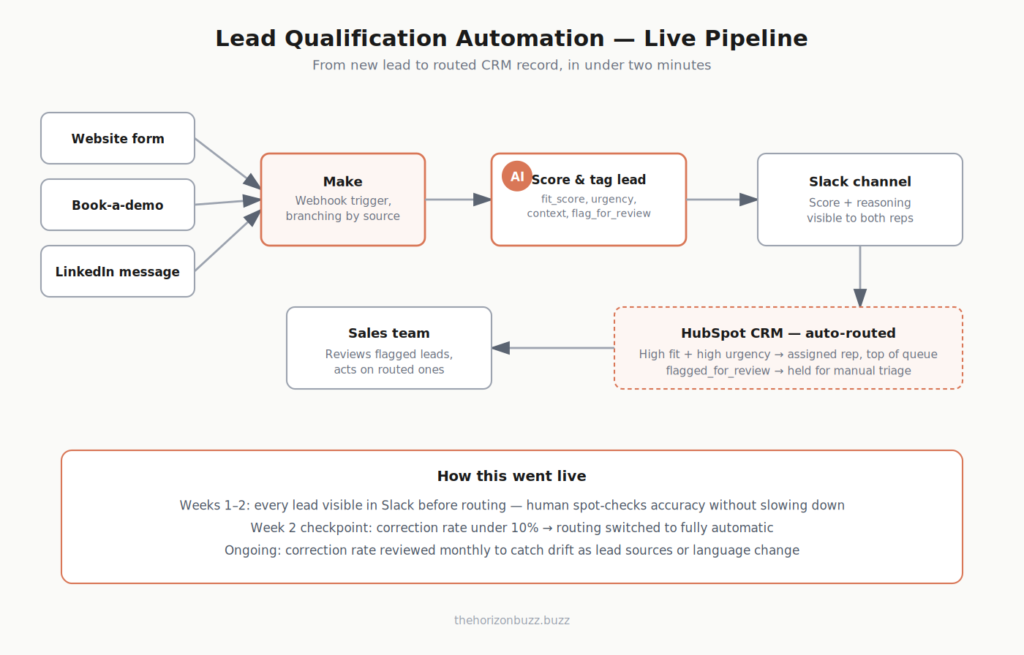
The business: A small software company sells a project-management tool to mid-size teams. Inbound leads come from a website contact form, a “Book a Demo” button, and occasionally LinkedIn messages to the sales team. The sales team is two people. Every lead currently gets manually read, manually scored on fit, and manually assigned — which takes time away from actually talking to qualified prospects.
The goal: Every new lead is automatically read, scored for fit, tagged with relevant context, and routed to the right salesperson within minutes of arriving — with obviously low-fit leads filtered into a separate, lower-priority queue instead of the main pipeline.
Applying the four phases
Planning. The team writes out their current manual scoring criteria: company size, stated use case, urgency language in the message (“need this live by next month” vs. “just exploring options”), and which competitor tool, if any, they mention switching from. Risk tolerance is assessed as low-to-medium — a misrouted lead costs a delayed reply, not a serious business problem, so a lighter checkpoint is acceptable here compared to something customer-facing.
Tool stack. They chose:
- Trigger: Their existing form tool’s native webhook, firing on every new submission
- Automation layer: Make, handling the branching logic between form, demo-booking tool, and LinkedIn-sourced leads
- AI layer: A direct API call to a language model, since they wanted precise control over the scoring prompt rather than a generic built-in AI step
- Storage/destination: Their existing CRM (HubSpot), since a good destination already existed — no need for a separate database
- Monitoring: A Slack channel posting every lead’s score and routing decision, visible to both salespeople
The prompt, sent for every new lead:
“You are scoring an inbound sales lead for a project-management SaaS product. Based on the lead’s message below, respond with a JSON object containing: fit_score (1–10, where 10 is a strong fit — mid-size team, clear stated use case, no red flags), urgency (high, medium, low, based on language used), context_summary (one sentence capturing what they said, under 25 words), and flag_for_review (true if the message is ambiguous, mentions enterprise-scale needs, or doesn’t clearly fit standard use cases). Lead message: {lead_text}”
Build and test. Before going live, the team ran this prompt against 40 real historical leads pulled from their CRM and compared the AI’s fit_score to how the leads had actually converted. This surfaced one issue early: leads mentioning “just researching for a future project” were scoring higher than they should have on urgency, since the model was reading polite interest as urgency. The prompt was revised to explicitly instruct treating exploratory language as low urgency regardless of tone.
Going live. The rollout: for the first two weeks, all leads still landed in the Slack channel with their AI-generated score before being routed, so the sales team could spot-check accuracy without slowing down their own workflow. After two weeks, the correction rate (how often a human manually re-scored a lead differently from the AI) was under 10%, so the routing became fully automatic, with a note in the CRM record showing the AI’s original score and reasoning for transparency — so a salesperson opening a lead could always see why it was routed where it was.
The Result
New leads now get scored and routed within roughly two minutes of arriving, instead of sitting until someone had time to read the whole inbox. The two salespeople spend their morning triage time on judgment calls the AI explicitly flagged for review, rather than re-reading every single lead from scratch — which is the actual measure of whether this kind of automation was worth building: not that it replaced a person, but that it removed the repetitive part of the job and left the judgment part intact.
Maintaining It Long-Term
An automation that works at launch can quietly degrade. Revisit it periodically:
- Check the correction/override rate monthly, not just during the initial rollout window
- Watch for shifts in the input itself — new lead sources, a new product line, seasonal changes in customer language — that the original prompt wasn’t built to handle
- Keep the documentation updated when the prompt or logic changes, so it doesn’t drift out of sync with what the automation actually does
The Real Takeaway
The tools involved in AI automation change constantly new platforms, new models, new integrations. What doesn’t change is the underlying discipline: understand the process before automating it, scope the AI to the parts that genuinely need judgment, test against real and messy data before anything is live, and roll out gradually with a way to catch mistakes. The lead-qualification example above didn’t succeed because of a particularly clever prompt — it succeeded because the team spent more time defining what “good” looked like than they spent picking software.
Related Buzz: We also covered [The Best Free AI Tools for Small Businesses in 2026]